

5 Best Samsung Video Downloaders | 100% Free
Worldwide, Samsung is a popular high-tech electronics brand cherished by millions of people. In the modern era, it has established itself as one of the most widely used Android smartphone brands. Additionally, it develops a wide range of apps for its users. However, so far Samsung has not released an official video downloader for its users. The good news is that there are third-party apps available that can help you download videos on Samsung devices. In this article, we will discuss in detail how a popular app called Vidmate can act as the best alternative to download videos on Samsung.
one
Here is the catalog
Part 1. Vidmate: Best Samsung Video Download App
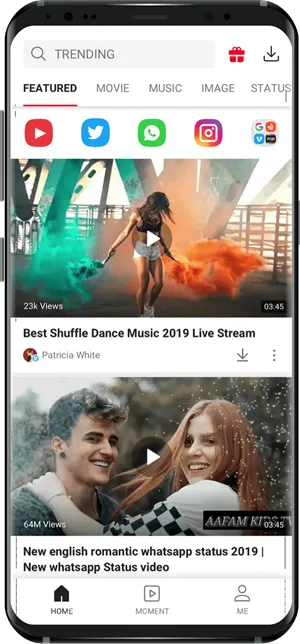
Compatible with all major Android devices, Vidmate is a free Samsung video downloader. With this app, you can download tons of videos from different streaming sites. It also gives users the option to customize video resolution and file size. Thanks to its user-friendly interactive interface, people of different age groups can easily use this app without any problem.
 Get Video Downloader
Vidmate stands out from other apps of its kind when it comes to using a social platform and sharing videos all in one place. When you use Vidmate, there is no need to switch between different apps to find a video of your choice.
With Vidmate, you can add several other platforms to your existing list.
Provides support for downloading and streaming high-definition content.
With Vidmate, you can get popular and exciting video content.
You can customize your videos, save them to your Samsung device in different resolutions, and watch them offline.
Vidmate also has other useful features like YT login, picture-in-picture mode, and a fast-loading player.
If you want to download videos on Samsung devices, Vidmate offers different methods to do so. You can use a link to download videos directly through the app. It only takes one tap on a platform supported by Vidmate. It’s an easy process and does not require prior technical experience. All you need to do is follow these simple steps.
Step 1: Launch the Vidmate app on your Samsung device
If you haven’t installed the Vidmate app on your Samsung smartphone, you need to download and install it from the official Vidmate website. Once you have downloaded the app, tap it to complete the installation. After installation is finished, you can launch the app from your Samsung device and access its features.
Step 2: Search for the video you want
There are two main ways to search for video content.
Simply open any video-sharing app on your device that is supported by Vidmate, such as Instagram, Twitter, YT, Dailymotion, and Facebook. Find the video in the native interface of those apps. If you find it, copy the video link or URL.
Another option is to use Vidmate’s native interface. Vidmate allows you to browse various social platforms and videos. All you have to do is click the platform to search videos. Use the search bar and enter relevant keywords to get downloadable links to your favorite videos.
In summary, you can find the video you want by providing its URL directly or by entering relevant keywords into the search bar. If needed, any other website can be integrated into Vidmate’s existing platform.
Step 3: Download the video to Samsung
Depending on the query source, Vidmate will give you relevant results in its native interface. A download icon appears next to the video and you can click it to save the video content to your Samsung phone. It is also possible to watch the video within Vidmate’s native interface. Simply click the video icon and it will start streaming. If you want to download it, click the download icon at the bottom of the video player.
The app will provide different options related to video resolution and file size. Choose the desired resolution and click to start the download process. Once the download is complete, you can access and play the video even without an Internet connection. In the downloads folder, you can find the videos saved by Vidmate and also in your smartphone’s original video app storage.
That’s all it takes to download and watch videos with the Vidmate app. The great thing is that Vidmate can be used seamlessly on Samsung Galaxy phones or other Samsung-branded mobile communication devices. Its appealing features will make you love it. Use it just once and it will undoubtedly become your favorite video-downloading app. You won’t have to spend a dime to use this app; however, you should remember that the app may contain third-party ads. Since it’s available for free, you can install and use it as you wish. The app size will take up little space in your phone’s memory or on the external SD card.
Part 2. Top 4 Samsung Video Download Software
1. YT Go
This is a lightweight Google app that works well on low-end smartphones. If you want to download YT videos legally and for free, you can try this app. This app won’t repeatedly ask you to subscribe to a premium version. With this app, you can also share HD videos without a dedicated Internet connection or offline link. However, this app is exclusively for YT and does not support other platforms like Instagram or Facebook.
2. TubeMate
2. TubeMate
3. SnapTube
If you are looking for a free-to-use YT video downloader, you can use SnapTube. Aside from having an easy-to-use interface that organizes videos based on categories, popular sites, and trending videos, it also allows you to search for videos directly from its search bar. It is a very lightweight YT downloader that can download videos in HD. Besides, SnapTube lets you share videos to other platforms like Facebook, Twitter, and Instagram. The videos you download will be saved to your device's default storage so you can access them whenever you want.
4. YT Downloader YT3
If you only want to download videos in MP4 format and audio in MP3 format, YT3 YT Downloader is a good choice. Thanks to its user-friendly interface, it is easy to use. The preview button helps you check the look and usability of a song before downloading it. It is one of the few apps that displays song lyrics while playing. With this app, you can download videos in high quality or choose a resolution to customize. One thing to keep in mind is that the app only downloads music and videos from the YT platform.
 Get Video Downloader

